Error Code Lookup
Find the meaning and solution for error codes displayed on your Mitsubishi Electric products.
Select Product Category

Enter Error Information
Select Error Type
Enter Blink Count
Number of Blinks
Light Blinking Error Results (6 results)
| # | Light Blinking (Times) | Type | Description / Cause | Solution | Remark |
|---|---|---|---|---|---|
| 1 | 2 | Indoor |
Fan motor operation drive error 1. The Lossnay fan does not stop due to a breakdown of the fan motor operation drive of the circuit board |
1. Check and replace the circuit board. 2. Check and replace the fan motor View details |
*LGH-150 and 200 types do not display errors |
| 2 | 3 | Indoor |
Damper related error 1. Damper board operation is not correct |
1. Remove the rod, and check whether the damper board can be moved manually. 2. Check the connection of the lead wire connectors and the circuit connector. 3. Check the switch (SW5-10) setting. LGH-15 to 100 types : OFF. LGH-150 and 200 types : ON View details |
- |
| 3 | 4 | Indoor |
OA thermistor related error Connectors for the thermistor are not correctly connected |
Check the connection of the lead wire connectors and the circuit connectors View details |
- |
| 4 | 5 | Indoor |
RA thermistor related error Connectors for the thermistor are not correctly connected |
Check the connection of the lead wire connectors and the circuit connectors View details |
when not using M-NET |
| 5 | 8 | Indoor |
External device error When the TM3 ⑥,⑦ output setting switch (SW5-6) is ON, the following conditions are applied |
1. When external devices are connected, check the external devices. 2. When external devices are not connected, check the TM3 ⑥,⑦ output setting switch (SW5-6) View details |
- |
| 6 | 9 | Indoor |
Remote controller communication error 1. No Lossnay unit is set to "Main" |
1. Turn off the main power and set the Main/Sub selection switch (SW1)(set the first unit to "Main" and the second and following units to "Sub"). 2. Using suitable cables, wire the transmission cables so that they are separated from one another. 3. Wire the transmission cable at least 5 cm away from the power supply cable. 4. Check the transmission cable connection. 5. Check the length of the transmission cable wiring View details |
- |
No matching error found
Try adjusting your search terms.
How to check error by yourself
Self-diagnosis guide for Mitsubishi Electric products
การแสดงรหัสข้อผิดพลาดของ LOSSNAY
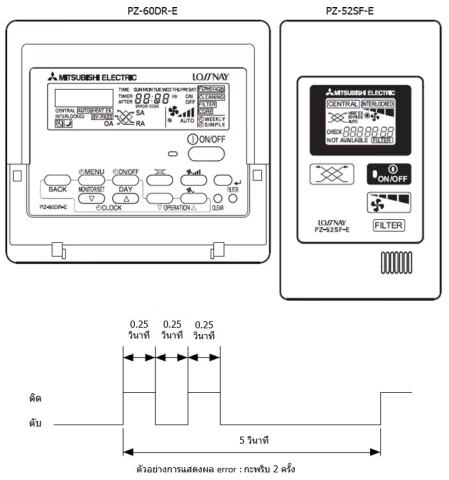
1) Error Code จะแสดงที่รีโมทคอนโทรล
2) LED บนแผงควบคุมวงจร LOSSNAY จะกะพริบหรือติดสว่าง
Error Code จะแสดงที่รีโมทคอนโทรล (PZ-600DR-E, PZ41SLB-E, PZ52SF-E) หรือ M-NET Controller และการกะพริบหรือติดสว่างของ LED1 (สีเขียว) หรือ LED2 (สีแดง) บนแผงควบคุมวงจรจะแสดงชนิดของ Error โดย LED จะกะพริบ 0.25 วินาทีทั้งติดและดับ ระยะเวลาการแสดงผลประมาณ 5 วินาที